
Looking for the best UPS for CCTV cameras to ensure 24/7 surveillance security? Power outages don’t wait—and neither should your security system. A reliable Uninterruptible Power Supply (UPS) is essential backup for every CCTV installation. Whether you protect a home, office, shop, or warehouse, it helps to know UPS capacity, backup time, and cost. This full guide covers how to choose, install, and maintain a UPS for CCTV cameras and DVR/NVR systems.

UPS Power Backup for CCTV Cameras and DVR
An outage in power can make your surveillance system into a blind spot in a matter of minutes. If power goes out, cameras cease recording. Blind spots are visible. Critical footage gets lost. A Uninterruptible Power Supply (UPS) can solve this issue. It offers instant battery backup. It will keep your cameras, recorders, as well as network equipment, online in the event of power interruptions. A temporary power solution is only a short-term fix.
A properly sized UPS can keep power on during an outage. It can cover the time until power is restored. It also covers the period until the generator comes on.
Why Power Backup is Essential for CCTV Systems
In the absence of UPS security, even a momentary power outage can create a security hole. Your DVR or NVR may cease recording. Your network connection might be interrupted. The surveillance evidence could disappear forever. Beyond security concerns, a sudden power outage can damage hard drives. It can destroy DVR and NVR electronics. It can also lead to costly repairs. A reliable UPS will prevent all of this by providing an uninterrupted, steady power supply throughout your system.
How UPS Protects CCTV Cameras During Power Outages
If the mains power goes out When power goes out, an UPS detects the power outage in milliseconds. It switches over to battery power on its own. This seamless transition ensures that the cameras record indefinitely. The UPS will also guard against spikes in voltage and surges. High-quality UPS units can withstand power surges of up to 10,000 Volts. This can protect expensive cameras and recording equipment.
Types of UPS for CCTV Cameras
The market offers three main UPS types. Each type has different protection levels and use cases.
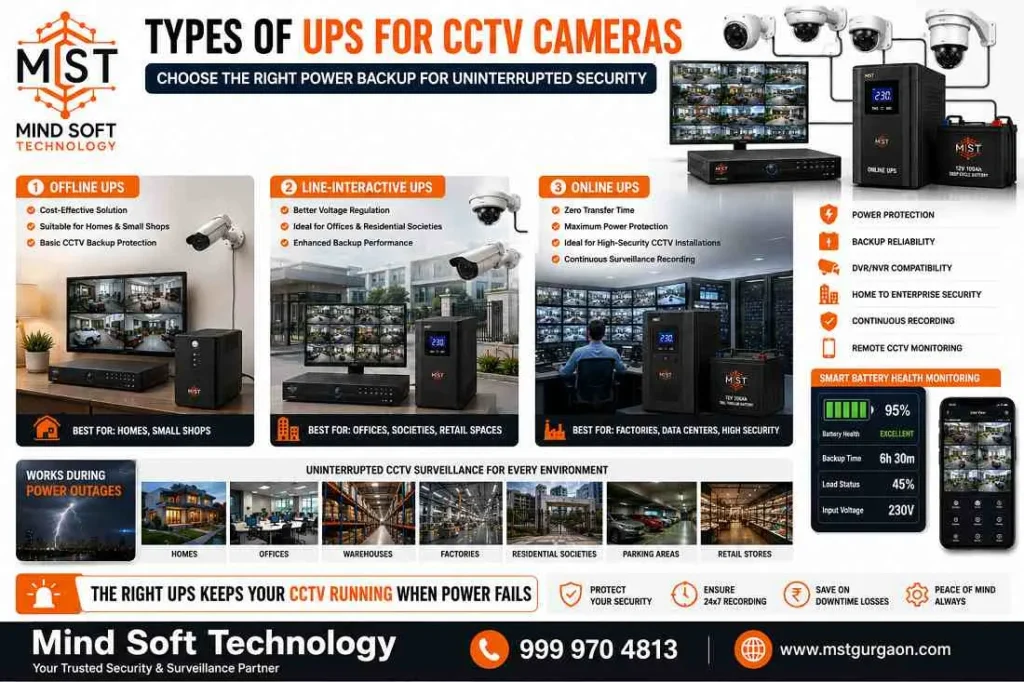
Offline UPS vs Line-Interactive UPS
Offline (Standby) UPS provides basic battery backup and surge protection, ideal for small, non-critical surveillance setups. When power fails, it switches to battery mode after detecting the outage.
Line-Interactive UPS is the best choice for most CCTV installations. It has an automated voltage regulation (AVR) that can handle small power fluctuations without relying on the battery. This helps to make it more efficient. This reduces voltage fluctuations and spikes. It protects sensitive camera electronics and extends the hardware’s lifespan.
Online UPS for High-Security CCTV Installations
Online (Double-Conversion) UPS represents the highest protection tier, continuously filtering and conditioning power regardless of mains status. Online UPS systems have no transfer time during outages. They are a good fit for mission-critical sites. These include data centers, airports, and large facilities.
Key Features to Look for in a CCTV UPS
Battery Capacity and Backup Time
The battery capacity, measured by amp-hours (Ah), is the determinant of how long your system is running in case of an interruption. A 600VA UPS will typically provide between 20 and 40 minutes of back-up time for smaller systems. A 1500VA unit is able to run a setup with four cameras for between 18 and 24 minutes. For bigger installations (8and cameras), you should aim at 2000VA or greater.
Surge Protection and Voltage Stabilization
Quality UPS systems include built-in surge protection and automatic voltage regulation (AVR). These features protect cameras from voltage spikes. They also stabilize input power during fluctuations. This is vital for protecting sensitive NVR hard drives and camera electronics.
UPS Backup Time for CCTV Cameras and DVR
Backup Duration Based on Camera Count
- 4 cameras + 1 NVR (40–60W load): 650VA UPS provides 20–40 minutes runtime
- 8 cameras + NVR (120–160W load): 1000VA UPS provides 20–30 minutes runtime
- 16 cameras + equipment (250–350W load): 2000VA+ UPS provides 30–60 minutes runtime
Factors That Affect UPS Performance
Runtime depends on the battery capacity, the device load, and the UPS efficiency. UPS efficiency is usually between 80% and 90%. More watts of consumption can drain batteries more quickly. For instance, 100 watts lasts for 40 minutes, and 200 watts takes 17 minutes. Temperature and environmental factors affect performance too.
How to Choose the Right UPS for CCTV Systems

Selecting UPS Capacity for Home Security
For home installs, add the wattage of the cameras, NVR, and router. Then pick a UPS with at least 25% extra capacity. A typical home setup (4–8 cameras) needs 30–60 minutes of runtime, making a 1500VA UPS ideal.
UPS Solutions for Offices, Shops and Warehouses
Commercial settings require a minimum backup of 15–20 minutes. Many businesses use dedicated 1500VA units for the DVR or NVR. In larger installations, smaller UPS units protect camera groups or PoE switches separately.
CCTV UPS Price Guide
Budget-Friendly UPS Options
Entry-level 600VA to 1000VA line-interactive UPS units offer great value for home and small office CCTV systems. They usually cost ₹5,000 to ₹12,000. These provide adequate protection for basic surveillance needs.
Premium UPS Systems with Extended Backup
High-capacity 2000VA–3000VA online UPS systems use LiFePO₄ batteries. These batteries last 10 to 15 years. These UPS systems cost ₹25,000 to ₹60,000 or more. These premium solutions deliver extended runtime and maximum protection for mission-critical installations.
Installation and Maintenance Tips
Proper UPS Installation for Maximum Efficiency
Install the UPS in a well-ventilated area, keeping vents unblocked to prevent overheating. Ensure the device is easily accessible for maintenance. Connect only your CCTV equipment (cameras, DVR/NVR, and network devices).
This helps prevent unrelated loads from draining batteries. Use battery backup outlets for critical devices. Use surge-only outlets for less critical equipment.
Battery Maintenance and Replacement Guidelines
Regularly test your UPS and monitor battery health. Replace batteries every 2–3 years for optimal performance. Maintain proper charge cycles. Check terminal connections for corrosion. Store in cool, dry conditions. Maintenance-free, user-replaceable batteries simplify upkeep.
Conclusion
Ensure Continuous CCTV Surveillance with the Right UPS Power Backup
The right UPS for CCTV cameras is a wise investment. It will protect your most important security asset. If you’re protecting your office, shop or warehouse, having the proper backup power can help to prevent any downtime. Also, it provides assurance. Line-interactive UPS systems are suitable in the majority of configurations. They are reliable and protect without high costs.
Ready to upgrade your CCTV security with professional UPS installation? Mind Soft Technology delivers the best UPS solutions for CCTV systems in Gurgaon and the Delhi NCR.
Contact Mind Soft Technology Today: 📞 Call: 999 970 4813
✅ Expert consultation and site survey
✅ Competitive pricing on all UPS capacities
✅ Professional installation & maintenance support
✅ Warranty & after-sales service guaranteed
Don’t let power failures compromise your security. Reach out to Mind Soft Technology today for a UPS backup solution for your CCTV system.
FAQs – Best UPS for CCTV Cameras – Features, Price & Backup Time
What size UPS do I need for my CCTV system?
Choose a UPS based on the total wattage of cameras + DVR/NVR + router/switch. Add 25–30% headroom. Typical choices: 650–1000VA for 4–8 cameras.
Use 1500VA for medium systems.
Choose 2000VA or more for 16+ cameras.
This also helps with longer runtimes.
How long will a UPS keep my cameras running?
Runtime depends on battery capacity and load. A 650–1000VA UPS usually provides 20–40 minutes for small systems.
A 1500VA unit can provide 20–30 minutes for 4–8 cameras.
A 2000VA or larger system can provide 30–60+ minutes.
The exact time depends on the batteries.
Should I buy line-interactive or online UPS?
For most homes and small to medium CCTV installations, a line-interactive UPS with AVR offers the best mix of protection and cost. Choose an online (double-conversion) UPS for mission-critical, zero-transfer-time environments.
Can a UPS protect my DVR/NVR from voltage spikes?
Yes. Good UPS units include surge protection and AVR. They protect DVRs, NVRs, and camera electronics from spikes and sags. They also help with unstable mains. This lowers the risk of data corruption or hardware damage.
Can I connect PoE switches and multiple cameras to one UPS?
Yes, but size the UPS to handle the combined power draw. For larger PoE installations, use a dedicated high-capacity UPS for the PoE switch and NVR. Or split the load across multiple UPS units for longer runtime and added redundancy.
How often do UPS batteries need replacement?
Sealed lead-acid batteries typically last 2–3 years under regular use. Lithium (LiFePO4) options can last 8 to 15 years. Test batteries often and replace them when capacity or runtime drops a lot.
Where should I install the UPS and how do I maintain it?
The UPS in a cool, well-ventilated, dry area that has easy access. Make sure that the vents are clear. Avoid placing heavy items on top. Connect only the most critical surveillance devices. Perform regular runtime tests. Examine the battery terminals for signs of corrosion. Follow the maintenance schedule of the manufacturer.